So you want to be a Kotlin developer?
You’ve come to the right place!
This book will take you through the fundamentals of Kotlin, gently introducing you to the most important concepts of the language in order to help you become a proficient Kotlin developer. Even if you’re a seasoned professional, it’s important to know the fundamentals in order to establish a solid foundation of understanding so that you can be as effective as possible.
Your adventure starts here in Chapter 1, where we’ll cover the basics of variables, expressions, and types.
Let’s get to it!
Introduction to Variables
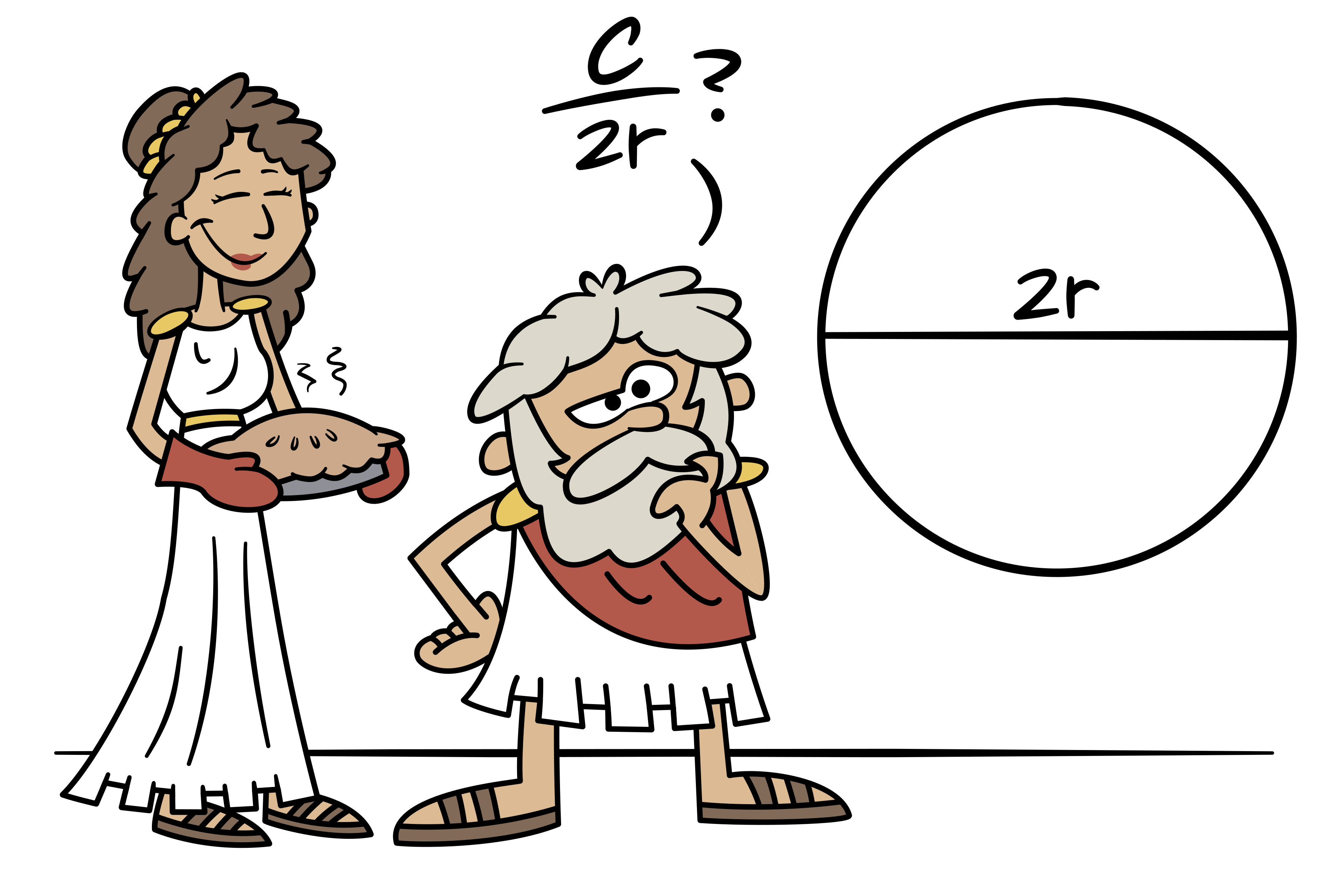
This is a circle.
In ancient Greece, Archimedes discovered how to measure the length around a circle, known as its circumference. You probably remember the equation from junior high geometry class.
“The circumference of a circle is equal to 2 times π times the radius of the circle.”
In the equation above, the letter r isn’t a number itself. It’s a letter that represents the radius—the distance between the center of the circle and the edge of the circle.
We call r a variable, because the radius can vary, depending on the size of the circle. In other words, the variable r isn’t a number; it’s kind of like a bucket that holds a number—any number.
Variables aren’t just for algebra and geometry. They’re also used all the time in programming, where they serve the same purpose: holding numbers—and other things! In Kotlin, you can create a variable and put a number into it like this.
var r = 5.2This code is actually doing two things on one line.
Declaration - When we write
var r, we’re declaring a new variable namedr. Declaring a variable is kind of like creating a bucket.Assignment - When we write
r = 5.2, we’re assigning the value of 5.2 to the variabler. In other words, we’re putting the number 5.2 into the bucket.Let’s break down the three main parts of this line of code:
In this code…
varis a keyword that tells Kotlin to create a new variable.ris the name of the variable. You might also hear this referred to as the variable’s identifier.The number5.2is the value that is being assigned.
varis just one of many keywords in Kotlin that we’ll see throughout this book. The important thing to remember about keywords is that they can’t be used as the name of your own things. For example, you can’t usevaras the name of a variable.var var = 5ErrorReassigning Variables
As we noted above, in the equation 2πr, the variable
rcan represent different numbers in different situations.In Kotlin, if you decide that you want
rto represent a different number, you can just reassign it, as shown in the second line here:var r = 5.2 r = 6.7When reassigning this variable, we didn’t need to use the var keyword again, because the variable was already declared on the first line.
Variables that Cannot Be Reassigned
Let’s look at that circumference equation again:
The Greek letter π (pronounced like the word “pie”) is very different from the variable r. Whereas r can hold any number in it, π only ever holds a single, specific number, which we’ll approximate as 3.14.
In the same way, when programming in Kotlin, there are times when we want to make sure that a variable’s value never changes.
In those cases, instead of declaring it with
var, we declare it withval, like this.val π = 3.14Now, if we try to reassign
π, we’ll get an error.val π = 3.14 π = 1.23ErrorOnce we put something in this bucket, we can never replace it!
Note that in Kotlin, regardless of whether it was declared with
varorval, it’s still considered a variable, and that variable still has a value. Soπis regarded as a variable, even though its value can’t vary.Declaring a variable with
valis a great way to make sure that we don’t accidentally change something that shouldn’t change. In fact, it’s a great idea to always start withval, and only switch tovarwhen needed.Naming Variables
It’s been fun using the letter π in our code, but unless you live in Greece, you probably don’t have it on your keyboard. From here on out, we’ll make life easier for everyone by naming it
piinstead. Also, instead ofr, we’ll name itradius, so that any other developers who come along later will know exactly what that variable represents—we don’t want others to have to guess what the letterrstands for!Sometimes you need more than one word for a variable’s identifier. In Kotlin, it’s customary to start the first word in lowercase, and then capitalize the remaining words, like this.
var radiusOfTheCircle = 5.2Now that we’ve got down the basics of declaring and assigning variables, we can start assigning more than just simple numbers—we can start assigning more complex calculations, like the circumference equation! Let’s dive into expressions!
Expressions and Statements in Kotlin
Let’s look at that equation one more time.
We’ve already created a variable for pi and a variable for the radius, so now we just need Kotlin to do some math for us, so that we can get the circumference of any circle, regardless of how big that circle is.
All we have to do is multiply together 2, pi, and the radius. In Kotlin, as in most programming languages, multiplication isn’t represented with an x; it’s represented with an asterisk
*so our code can look like this.var radius = 5.2 val pi = 3.14 val circumference = 2 * pi * radiusSo far we’ve only assigned simple values—such as 5.2 and 3.14. This is the first time we’re assigning something more complex:
2 * pi * radius.When Kotlin sees this, it simply calculates the result for you—it multiplies 2 times pi times radius, and then, of course, it takes the resulting value and assigns it to the variable named circumference. In this case (with a radius of 2.8), circumference will equal 17.584.
Since
2 * pi * radiuscan be calculated into a value like this, we say that it can be evaluated. Code that can be evaluated is called an expression. Here are a few examples of expressions:
2 + 32 * pi * rpi * r * rVariables by themselves are also expressions—they evaluate to whatever value they hold:
radiuspiWhen we type out a number by hand (as opposed to typing a variable name), it’s called a number literal. Literals themselves are also expressions—they evaluate to themselves! Here are a few examples:
25.23.14All of those examples will evaluate to some value. On the other hand, when we have a chunk of code that does not evaluate to a value, it’s called a statement.
Here’s an easy way to figure out if you’ve got an expression or a statement:
Rule: If you can assign a chunk of code to a variable, it’s an expression. Otherwise, it’s a statement.
Let’s apply this rule to the first expression from each of the three lists above (2 + 3, radius, and 2). In the next code listing, the highlighted parts are the expressions.
val a = 2 + 3 val b = radius val c = 2Since each of those can be assigned to a variable, they’re all expressions.
The only statement we’ve seen so far is the assignment statement, such as val
pi = 3.14. Following the guideline above, we can try to assign this statement to a variable, but it won’t work.val a = val pi = 3.14ErrorWhen we try to do this, Kotlin gives us a helpful error message, “Expecting an expression”. If you ever see this error message, it just means you tried to use a statement where Kotlin wanted an expression.
The distinction between statements and expressions is important as you’re learning Kotlin, and we’ll use those terms often throughout this book.
So far, whether we’ve used literals or complex expressions, we’ve still only ever assigned numbers to variables. But there are lots of other things that variables can hold! Let’s explore some of these things next.
Types: Different Kinds of Values
In Kotlin, different variables can hold different kinds of values. The kind of value that a variable holds is known as its type.
Let’s take another look at the variables
radiusandpi.var radius = 5.2 val pi = 3.14In this case, both
radiusandpirepresent numbers that have a decimal point, which is a type that Kotlin calls aDouble. It’s also possible to tell Kotlin the type of the variable explicitly, like this.var radius: Double = 5.2 val pi: Double = 3.14When we do this, we are explicitly specifying the type.
Very often, we don’t have to specify the type of a variable explicitly. In that case, Kotlin will do its best to infer the type based on whatever it is that we’re assigning to the variable. That process is called type inference.
So, when we write this…
var radius = 5.2…then Kotlin knows that
5.2is aDouble, so it automatically usesDoubleas the type ofradius.In addition to
Double, there are some other basic types that are good to know about! Let’s take a look at some of those now.Integers and Longs
So far we’ve only used numbers that have a decimal point in them, such as 5.2 and 3.14. But you might also use a number that does not have a decimal point, like 5 or 3. These kinds of numbers are called integers, and in Kotlin the type for an integer is just called
Intfor short. Here’s an example that creates an integer variable.val numberOfDogs: Int = 3An
Intvariable can hold a number between about negative two billion and positive two billion. For those cases where you need an integer that exceeds these limits, you can use aLongtype, which supports much larger values.Booleans
Sometimes we want a variable to hold a value that is only ever one of two values—either on or off, yes or no, true or false, and so on.
In those cases, a
Booleanvariable can work well. There are only two Boolean values—trueandfalse—and both of those are keywords in Kotlin.val earthIsRound: Boolean = true val earthIsFlat: Boolean = falseThe
Booleantype gets its name from George Boole, a British mathematician from the 1800s who came up with a branch of algebra that uses true and false instead of numbers.Strings
We can also assign text values to a variable. The fancy programmer word for text is “string” because it’s a bunch of characters—such as letters, numbers, and symbols—all “strung” together.
In Kotlin, the type for this is called
String, and we can create aStringvariable with double quotes, like this.val text: String = "This is a string"Other Types
These are just some common types of variables. In Chapter 4, we’ll find out how we can create our own types—classes—which build upon these basic types that we just looked at.
Types and Reassignment
In Kotlin, the type of each variable is established when we write the code, and its type will never change (unless we rewrite the code). This is why we call it static typing. Once a variable has been declared with a particular type, no other type of value can go into it. For example, if we create a variable of type
Int, we can’t later assign aStringvalue to it.var numberOfDogs: Int = 5 numberOfDogs = "five"ErrorIn future chapters, we’ll see how some types can have subtypes. But we’re getting ahead of ourselves! For now, let’s wrap up this chapter.
Summary
Good job getting through the first chapter! Here’s what we covered:
- How to use
varfor variables that can be reassigned.- How to use
valfor variables that are read-only.- That expressions can be evaluated to a value.
- That statements do not evaluate to a value.
- How Kotlin has number types like
DoubleandInt.- How we can use the
Booleantype for true and false values.- How we can use the
Stringtype for text values.Now that you’ve got a good grasp on variables, it’s time to put them together in exciting new ways! In the next chapter, we’ll explore functions, which take input, process it, and deliver a result—without repeating the same expressions throughout our code.
Thanks to Matt McKenna, Jacob Rakidzich, and Doug Smith for reviewing this chapter.
Share this article: